Codex, Cloudflare Ask AI, Google AI Overview and Firefox AI Chatbots are four representative AI assistant products recently. They are all called “AI assistant” or “AI Copilot”, but their architecture design, user interaction, business goals and market entry are quite different. This article attempts to analyze these four products from a system design perspective, looking at how they embed AI capabilities into different user scenarios and business defenses.
1. First, put them back in their positions
If only looking at the interaction form, these four products all seem like “user asks a question, AI answers”. But from the product architecture and business goals, they are actually solving four completely different problems.
| Product | More accurate positioning | AI access point | Business value |
|---|---|---|---|
| Codex | Software engineering agent | Code repository, execution environment, GitHub / PR workflow | Turn natural language tasks into reviewable, runnable, mergeable code changes |
| Cloudflare Ask AI / Agent Lee | Cloud control plane agent | Cloudflare Dashboard, account configuration, Cloudflare API | Reduce cloud platform operation complexity, make natural language the platform entry |
| Google AI Overview | Generative answer layer on search results page | Google Search, ranking, Knowledge Graph, web results | Protect search entry, compress multi-webpage retrieval into readable answers |
| Firefox AI Chatbots | Third-party AI router in browser | Firefox Sidebar, selected text on page, third-party chatbot | Keep AI usage entry in browser, delegate model capabilities to third parties |
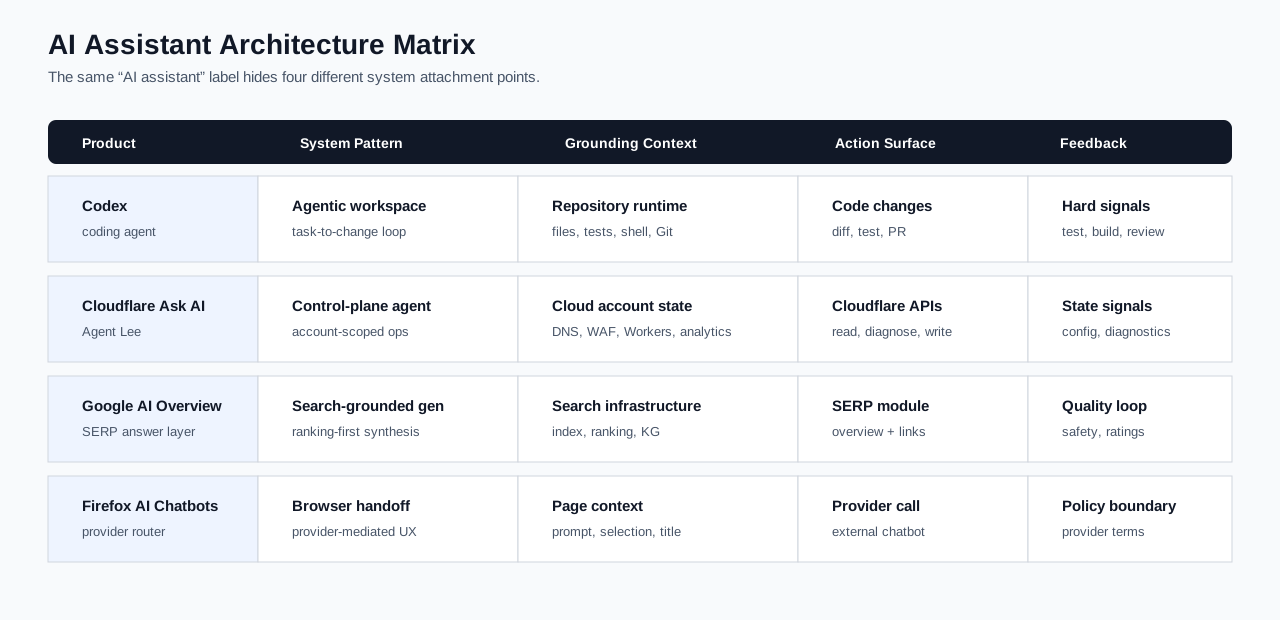
To ensure the following architecture diagrams are not just “reasonable imagination”, first align the public facts with the nodes in the diagram:
| Product | Official materials explicitly mention | Corresponding nodes in diagram |
|---|---|---|
| Codex | Codex Cloud and Codex documentation explain: Codex can read / edit / run code; Codex Cloud can handle tasks in a cloud environment; after connecting to GitHub, it can work based on the repository and create PRs. | Repository, Execution, GitHub Context, Reviewable Artifact |
| Cloudflare Agent Lee | Agent Lee documentation and Cloudflare launch blog explain: It is built into Dashboard; works based on real account data; write operations require explicit approval; supports DNS/TLS/WHOIS/RDAP diagnostics; uses Agents SDK, Workers AI, Durable Objects, Cloudflare MCP server. | Dashboard, Read Plane, Diagnostics, Write Path, Approval, MCP Tools |
| Google AI Overview | Google Search official PDF explains: AI Overviews uses Search-customized Gemini, combined with ranking systems, quality systems, Knowledge Graph, high-quality web results, supporting links and safety mechanisms. | Eligibility, Search Grounding, Gemini for Search, SERP Output |
| Firefox AI Chatbots | Mozilla Support and Firefox product page explain: Firefox Sidebar allows selecting third-party chatbot; when using suggested prompts, the prompt, selected text, and page title are sent to the user-selected chatbot. | Sidebar, Provider Selection, Local Context, Payload Handoff, Provider Boundary |
Next, let’s look at each one. The focus is not on “whose model is stronger”, but on what system the model is placed into.
2. Codex: Putting AI into the Software Engineering Loop
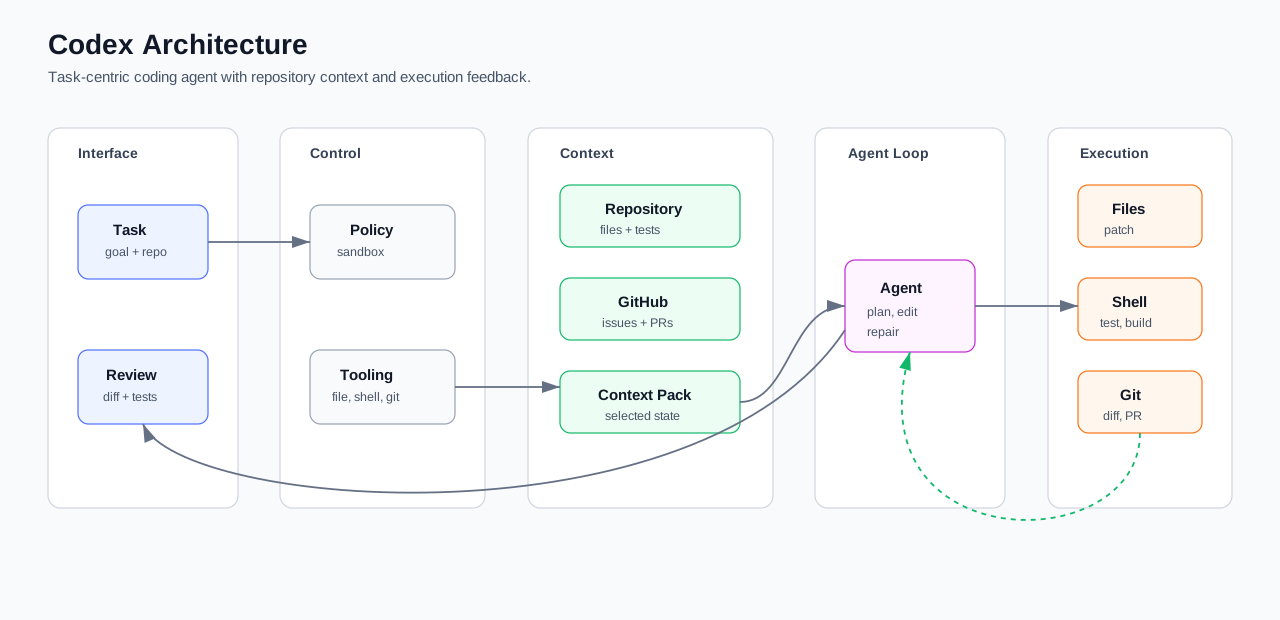
OpenAI’s public positioning of Codex is clear: it is not an ordinary chat model, but a coding agent. The Codex Cloud documentation states that Codex can read, modify, and run code; Codex Cloud can process tasks in the background in a cloud environment; after connecting to GitHub, it can work within the repository context and create pull requests. More complete product forms, including CLI, IDE, Web, GitHub integrations, sandboxing, permissions, etc., are also concentrated in the Codex documentation.
Therefore, Codex’s architecture cannot simply be drawn as “user -> model -> response.” A more realistic understanding is: the user gives an engineering task, Codex collects repository and task context, plans modifications, edits files, runs tests or build commands, continues fixing based on output, and finally generates a reviewable diff or PR.
User proposes an engineering task
-> Collect repository and task context
-> Plan modifications
-> Edit files
-> Run tests, builds, or checks
-> Continue fixing based on output
-> Generate a reviewable diff / PR
The most valuable part of this chain is not that “the model can write code,” but that “code can be verified by the engineering environment.” Whether tests pass, builds fail, or diffs are reasonable are harder feedback than natural language responses. Early ChatGPT could tell you “you should change it this way,” but it didn’t know your repository’s actual dependencies, whether hidden tests would fail, or whether the team would accept the diff. Codex’s direction is to incorporate this engineering feedback into the loop.
From a business perspective, Codex sells not Q&A but R&D throughput. It targets repetitive code refactoring, test fixes, dependency upgrades, initial bug localization, PR draft generation, and documentation-code synchronization. Whether enterprises are willing to integrate it into their development process depends not only on model performance but also on permission control, code ownership, auditing, CI integration, review processes, and GitHub workflow adaptation.
The most noteworthy aspect of Codex is not that it “can write code,” but that it places code writing back into the engineering workflow. Code completion improves input speed; Codex aims to improve task completion speed. In the short term, it is more like a virtual engineering member that prepares candidate changes, rather than a replacement for engineers. The real value will emerge in teams with clear human-machine division: AI handles exploration, modification, test execution, and PR preparation; humans handle requirement judgment, architectural boundaries, code review, and final responsibility.
3. Cloudflare Ask AI / Agent Lee: Putting AI into the Cloud Platform Control Plane
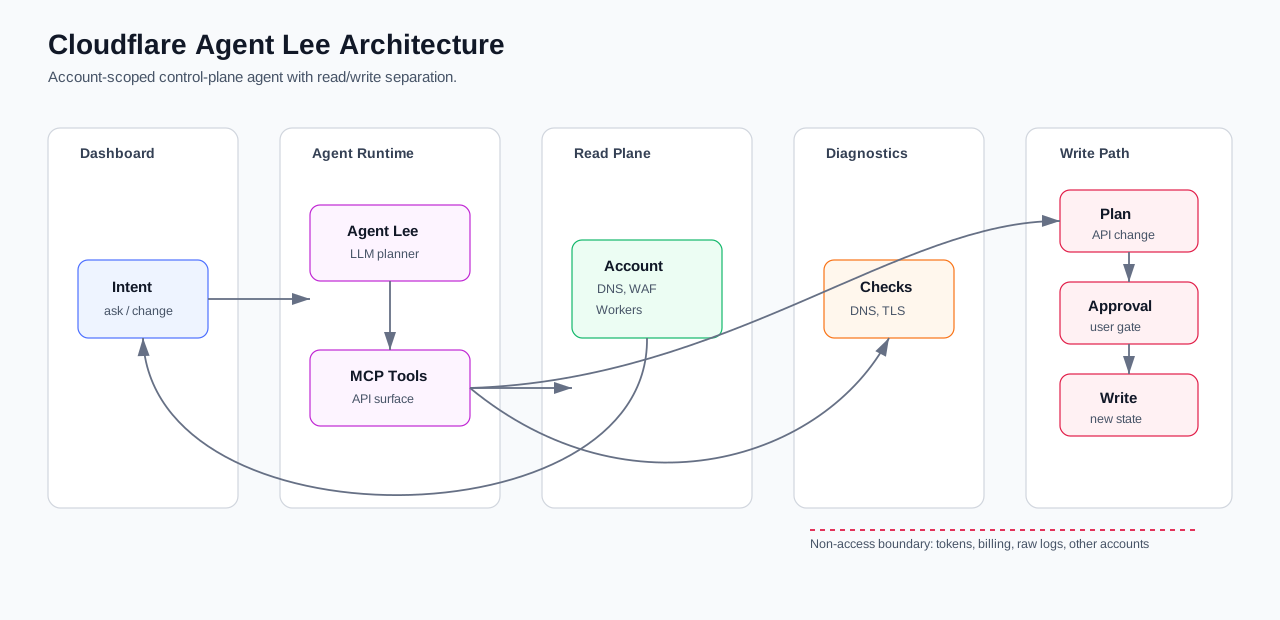
Cloudflare Agent Lee is an AI co-pilot built into the Cloudflare Dashboard. According to the Agent Lee documentation, it can understand user account configurations, answer questions based on real account status, and execute tool calls related to products such as DNS, Workers, SSL/TLS, R2, Registrar, Cache, Cloudflare Tunnel, and API Shield.
This type of product is most easily underestimated. It looks like a chat box in the console, but in essence, it adds a natural language operation layer to the cloud platform. Cloudflare disclosed relatively specific implementation details in Introducing Agent Lee: Agent Lee uses the Agents SDK, Workers AI, Durable Objects, and the Cloudflare MCP infrastructure; it does not simply expose MCP tool definitions directly to the model, but uses Codemode to convert tools into TypeScript APIs, allowing the model to write code that calls these APIs; the generated code is sent to an upstream Cloudflare MCP server for sandboxed execution; the intermediate Durable Object acts as a proxy with credentials, determining whether the call is a read or write; reads can be proxied directly, while writes must go through an elicitation gate, meaning explicit user approval; API keys do not appear in the model-generated code but are injected server-side.
Agent Lee is not an ordinary “LLM calls API”, but a control plane agent with permission classification, sandboxing, and an approval gate. Its basic flow can be understood as follows:
The user asks a question or proposes an operation in the Dashboard
-> Agent Lee understands the intent
-> Reads account status or performs diagnostics via MCP/API
-> Read-only questions directly return answers based on account facts
-> For write operations, a change plan is generated
-> The user explicitly approves
-> The change is executed via the Cloudflare API
-> Results are returned
The key design here is the separation of the read path and write path. The read path solves grounding, ensuring answers come from real account status; the write path solves security, preventing AI from bypassing user approval to directly modify online configurations. For cloud platforms, this is not just an improvement. Configurations like DNS, WAF, TLS, Tunnel, and Workers routing, if changed incorrectly, can affect online availability, security boundaries, and business traffic.
Cloudflare’s commercial motivation is also natural. Its product line is broad, and the complexity of the Dashboard grows with product capabilities. When a user troubleshoots an issue, they may need to switch between DNS, TLS, WAF, Workers, caching, logs, and documentation. The value of Agent Lee is to compress “checking docs, finding pages, understanding configurations, running diagnostics, and making changes” into a single natural language entry point. It increases platform usage depth and retention, rather than selling a standalone chatbot.
Agent Lee is a typical example of “control plane intelligentization.” It is not replacing Cloudflare documentation, nor just adding a chat box to the Dashboard; it repackages platform operations themselves into conversational workflows. In the future, platforms like AWS, Google Cloud, Azure, Datadog, Snowflake, Vercel, and GitHub will continue moving in this direction. Those who control account status, operation APIs, permission systems, and audit chains are better positioned to make AI the platform entry point.
4. Google AI Overview: Putting Generative Answers into the Search System
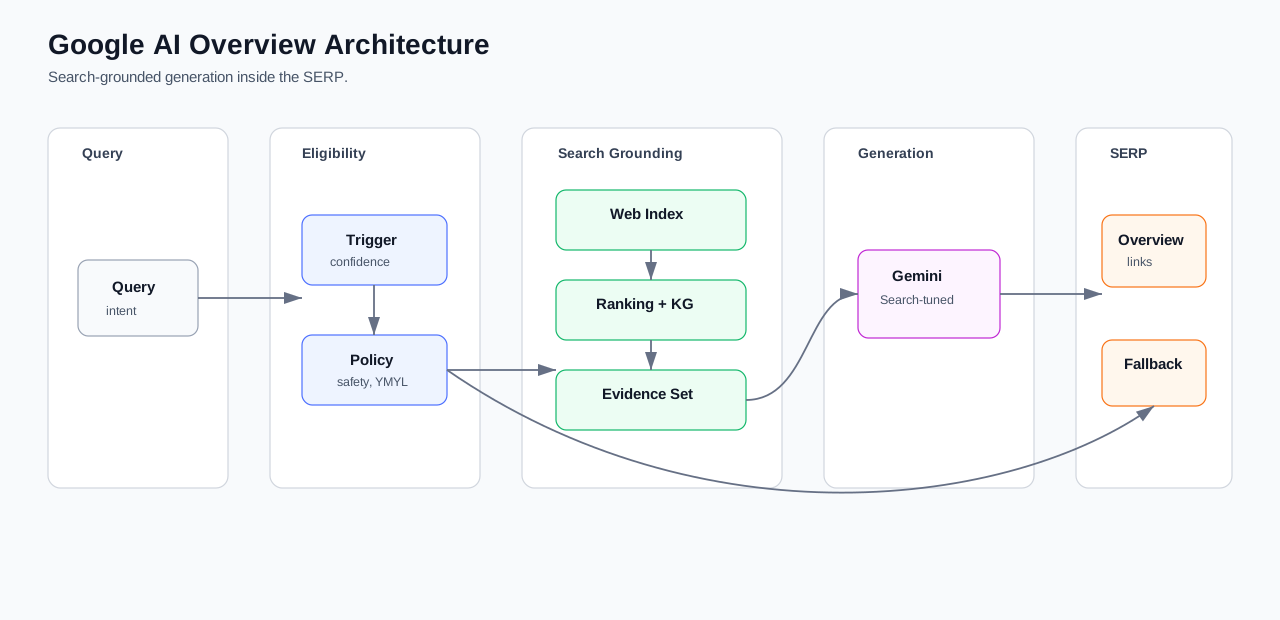
Google AI Overview is most easily misunderstood as a “chatbot in Google Search.” But the official Google Search PDF on AI Overviews and AI Mode is more specific: AI Overviews use a Gemini model customized for Search and collaborate with existing Google Search systems, including ranking systems, quality systems, Knowledge Graph, high-quality web results, supporting links, and safety mechanisms.
In other words, AI Overview is not a standalone Q&A application but a generative layer within the search system. Its workflow is roughly:
User inputs query
-> Determine whether the query is suitable for triggering AI Overview
-> Search system retrieves and ranks high-quality web results
-> Incorporate structured signals like Knowledge Graph
-> Custom Gemini model generates summary
-> Pass through quality and safety filters
-> Display AI Overview and supporting links in SERP
Two points are particularly important here.
First, the triggering mechanism itself is a product capability. Not all queries are suitable for generating AI Overviews. For health, finance, law, safety, time-sensitive news, or questions with insufficient data, if quality confidence is low, generative answers can package uncertainty into certainty.
Second, AI Overview is not ordinary RAG. Ordinary RAG is typically “retrieve a few documents, stuff them into the prompt, and generate an answer.” Behind Google AI Overview is search-grade infrastructure: web index, ranking, quality assessment, Knowledge Graph, safety policies, web ecosystem, and advertising system. The generative model is just one layer.
Commercially, AI Overview is Google’s re-defense of the search entry point. Users have started to pose complex questions to answer engines like ChatGPT and Perplexity. Google must ensure that Search remains the default entry point for questions. But this comes at a cost: AI Overview shifts part of the work of “reading and synthesizing after clicking a webpage” to the search results page ahead of time. User efficiency improves, but website clicks and the distribution of content ecology will also change.
Therefore, supporting links, trigger thresholds, and quality systems are not just technical details; they are also commercial balancing mechanisms. Google must directly answer users while not undermining the web content ecosystem’s incentive to continue producing high-quality content.
The core competitive focus of AI Overview is not “whether the model responds fluently,” but “whether the search ecosystem can bear the generative answer layer.” The risk of Codex is corrupting code; the risk of Cloudflare Agent Lee is corrupting configurations; the risk of AI Overview is subtler—it changes the order in which users consume information. The earlier the answer, the further back the webpage. The relationship among the search platform, content producers, and users will be redistributed.
5. Firefox AI Chatbots: Turning the Browser into a Context Entry for Third-Party AI
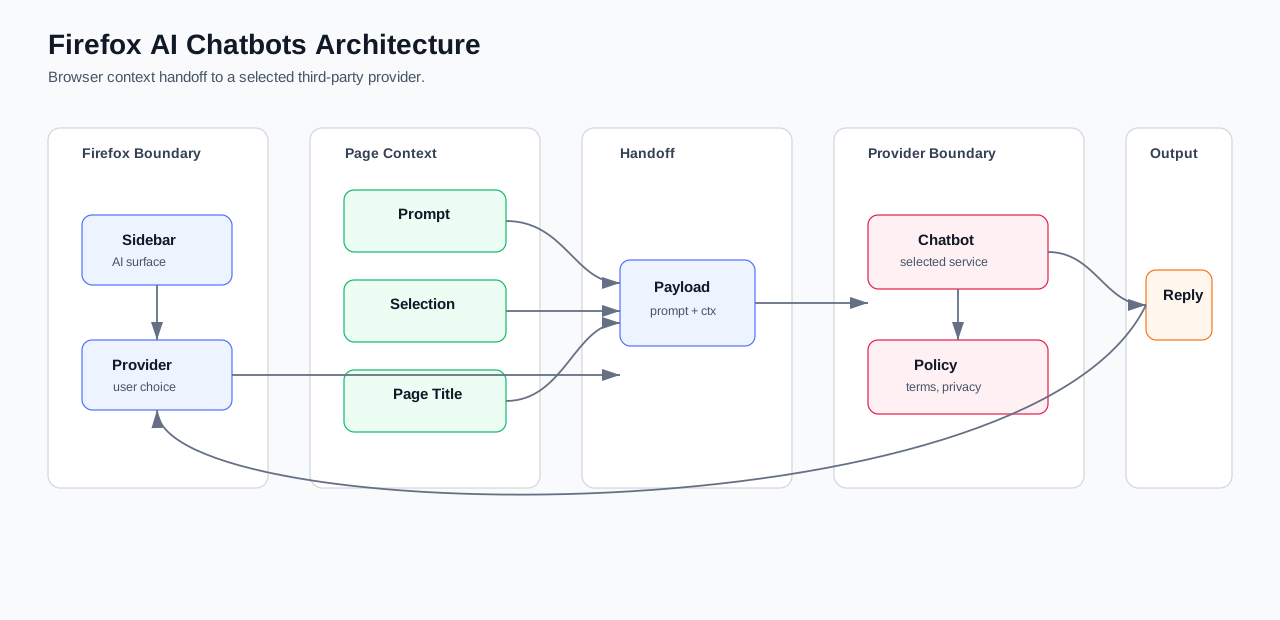
According to Mozilla’s official support documentation, Firefox can integrate third-party AI chatbots in the sidebar. When users select text and use suggested prompts, Firefox sends the prompt, selected text, and page title to the chosen chatbot. The Firefox product page also lists optional providers such as ChatGPT, Gemini, Copilot, Claude, and Mistral.
This indicates that Firefox’s focus is not on self-developing models but on provider routing and context handoff on the browser side. Its workflow is straightforward:
User reads or selects text on a webpage
-> Open Firefox AI sidebar
-> Choose a third-party provider
-> Firefox constructs prompt + selected text + page title
-> Send to the selected chatbot
-> Third-party chatbot returns result
-> Firefox displays in sidebar
The most important aspect of this chain is boundaries. Firefox controls the browser entry point and context handoff, but the actual model inference, account system, data storage, and training policies all reside on the third-party provider side. In other words, Firefox is an AI usage entry, not a model platform.
Commercially, this choice is realistic. Training and operating top-tier large models is extremely costly, and Firefox has no need to compete directly with OpenAI, Google, Anthropic, and Microsoft at the model layer. Instead, it chooses to retain the browser entry point and let users select their own provider. The benefit is a lightweight, open approach that respects user choice; the cost is that end-to-end capabilities are not fully controlled by Firefox, and privacy and data handling policies fall under the third-party provider’s policies.
Firefox AI Chatbots is an “AI distribution entry product.” It does not win by model quality but by browser context, user trust, and provider choice. This direction appears lightweight but is not weak. The browser is one of the core interfaces where users read, search, copy, and organize information. As long as AI can naturally enter this context, it can influence a large number of daily information tasks. Firefox’s choice is to leave model competition to providers while holding onto the entry point and user choice.
6. GitHub: The Essential Infrastructure in the AI Coding Ecosystem
GitHub is not one of the four products covered in this article, but it is unavoidable when discussing Codex and AI coding.
It is the core node of the public code ecosystem. The early OpenAI Codex introduction explicitly stated that the model is trained on natural language and publicly available source code. The GitHub Copilot Trust Center also has long focused on public code, training data, similar code detection, and enterprise data protection. We need to be careful here: we cannot simply say ‘all models query GitHub code in real time to learn.’ Different vendors, different models, and different data policies at different times vary. A more accurate statement is: the public code ecosystem has shaped code model capabilities, and GitHub is one of the central platforms in this ecosystem.
It is also the entry point for developer workflows. Issues, PRs, reviews, Actions, and commit history are all the most needed context for coding agents. If AI remains only in the chat box, it can hardly become a team tool; only by entering repo, PR, CI, and review processes can it become part of the engineering system. Feedback such as whether tests pass, whether a PR is reviewed, and whether code is merged or reverted is much closer to ‘whether this code actually works’ than ordinary web text.
Therefore, when vendors like OpenAI, Microsoft/GitHub, Google, and Anthropic compete in code generation and coding agents, they all eventually encounter the same entry point: who can more naturally enter repos, PRs, and CI.
This also raises a very practical question: since GitHub already has Copilot, why do many people still find Codex better? My view is that the difference is not mainly about ‘whether the model can write code,’ but about the default interaction model.
Let’s first clarify the boundaries: Copilot is no longer just ‘autocomplete.’ GitHub Copilot features list multiple entry points including autocomplete, Chat, IDE, GitHub.com, Mobile, and Terminal; the Copilot coding agent documentation also explains that Copilot can be assigned to create pull requests; on the IDE side, GitHub Copilot agent mode can edit code based on tasks and suggest running terminal commands when needed. GitHub also offers a model picker for users to choose between different models. In other words, today’s Copilot covers multiple levels from autocomplete, Q&A, model selection, to agent.
The problem is precisely here: Copilot has many capabilities, but also many entry points. It is like an assistant spread across IDE and GitHub; Codex is more like an agent organized around ‘completing this engineering task.’ Another easily overlooked difference: Codex is OpenAI’s own coding agent, where the model, tool calls, execution environment, permission policies, and product interaction can be optimized together around the same agent runtime; Copilot, while integrating multiple models, sees its model availability, support for different surfaces, capability boundaries, and interaction experience abstracted again by GitHub’s product layer. Multi-model choice is an advantage, but it also brings consistency costs. The following image better explains the experiential difference:
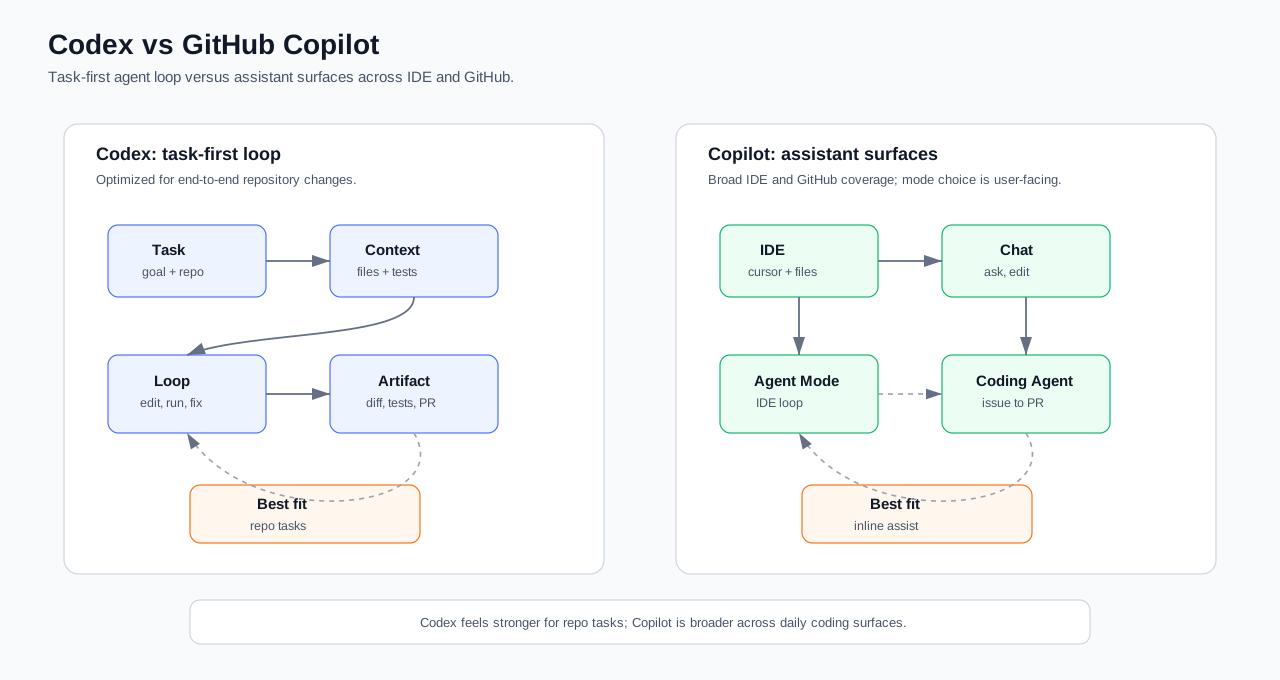
Codex’s interaction center is ‘task.’ Users usually start from a clear engineering goal: fix a bug, change a feature, migrate code, add tests. The system organizes repository context around this goal, executes commands, observes results, continues fixing, and finally outputs a diff, test evidence, or PR. Its chain looks more like:
Task -> Repository Context -> Execution Feedback -> Reviewable ChangeCopilot’s interaction center is more fragmented. It is both autocomplete in the IDE, Chat, agent mode, and a coding agent on GitHub. This coverage is huge, with the advantage of being everywhere; the cost is that users often have to decide which mode to switch to: when to use autocomplete, when to use Chat, when to activate agent mode, and when to assign an issue to Copilot. For small changes and local assistance, this is convenient; but for repository tasks that involve multiple files, multiple steps, and require repeated command verification, this fragmentation turns into friction.
A concise comparison is as follows:
| Dimension | Codex | GitHub Copilot |
|---|---|---|
| Default mental model | Task-oriented agent | Always-on assistant in IDE / GitHub |
| Best-fit scenario | Cross-file changes, test fixes, migrations, PR preparation | Completions, explanations, local edits, collaboration within GitHub |
| Context organization | Around task and repository | Around editor, open files, issues, or pages |
| Execution feedback | Emphasizes “modify -> run -> observe -> retouch” | Agent capabilities exist but entry points and mental model are scattered |
| Model-product alignment | Deep integration with OpenAI’s own models and Codex runtime | Wider model choices but harder consistency in experience |
| Deliverables | Diffs, test evidence, PR drafts | Completions, answers, local edits, PR/agent results |
| Perceived shortcoming | Feels more like a deliverable candidate | Can feel like many features pieced together |
So, when someone says “Copilot is indeed not as good as Codex”, I would qualify it in a more accurate scenario: when the task is an end-to-end repository change, not local coding assistance, Codex is usually more convenient. There are three reasons.
First, Codex’s task boundaries are clearer. It defaults to organizing interactions around “get this problem done”, while Copilot often starts with “I need a little help in the editor right now”.
Second, Codex’s feedback loop is more centralized. Reading code, modifying code, running commands, observing failures, continuing fixes — it all feels more like a continuous workflow; Copilot, though having agent mode and coding agent, often requires users to switch between completions, Chat, agent mode, issue agents.
Third, Codex’s model and product fit is more integrated. OpenAI can fine-tune the latest coding model, tool protocol, sandbox execution, and Codex interaction together; Copilot needs to provide unified packaging across GitHub, IDE, enterprise policies, and multiple model choices. Its compatibility is broader, but the “snugness” within an end-to-end task chain tends to be weaker.
Fourth, Codex’s deliverables are closer to what engineering teams look for: diffs, test evidence, explanations, PRs. Copilot is great during development, but its default experience is more like an “on-call assistant” rather than an “agent that converges a task into a candidate change”.
This is not to say Copilot has no value. Copilot’s advantages are solid: native to GitHub, wide IDE coverage, mature completion experience, multiple model choices, strong daily companionship. But if the evaluation criterion is “I give a cross-file task and want the AI to read, modify, run, fix, and finally give me a reviewable result”, Codex’s product form is closer to this goal. Its effectiveness stems from new models, aligned toolchains, a centralized agent runtime, and overall integration within OpenAI’s own products.
7. Market Directions Behind the Four Product Choices
| Product | Market Entry | Business Goal | Key Capabilities |
|---|---|---|---|
| Codex | Developer workflow | Improve R&D efficiency, enter enterprise engineering processes | Repository context, execution environment, GitHub/PR/CI integration, permissions & audit |
| Cloudflare Ask AI | Cloud console | Reduce platform complexity, increase product usage depth | Account status, Cloudflare API, diagnostic tools, approval mechanisms |
| Google AI Overview | Search results page | Defend search entry, compete with answer engines | Web index, ranking, Knowledge Graph, quality systems, link ecosystem |
| Firefox AI Chatbots | Browser sidebar | Retain AI usage entry in the browser | Provider selection, browser context, lightweight integration |
The differences among these four products ultimately come down to the commercial entry point.
Codex competes for the developer workflow. If successful, its value goes beyond helping individual programmers write a few fewer lines of code; it enters the enterprise development process: Issues, repos, CI, review, PR, merge. Once that entry is established, AI is no longer just a Q&A tool beside the developer but a production unit in the R&D pipeline. In practice, the product experience is somewhat stronger, but it still has a slight disadvantage compared to using Claude Code for actual work.
Cloudflare Ask AI competes for the cloud platform console. The stronger the cloud platform, the more complex the console; the more product lines, the more users need cross-product context understanding. The value of Agent Lee is to wrap Cloudflare’s complex capabilities into a lower-friction operational entry. It can increase product discovery and encourage deeper platform usage.
Google AI Overview competes for the question entry point. Search’s core business value comes from “users come here first when they have questions.” As answer engines begin to divert complex queries, Google must integrate generative answers into SERP to prevent outflow of user question entry. However, it cannot completely cut off the web ecosystem because search quality still relies on continuous high-quality web content production.
Firefox AI Chatbots competes for the AI entry within the browser. It does not engage in an AI model arms race but instead lets users choose their provider in the context of a web page. This strategy is lighter and more aligned with Firefox’s product ethos: not locking users into a single model, but preserving choice and the browser-side interaction slot.
Therefore, my overall assessment of these four product categories is: AI products are evolving from “universal chat boxes” into “scenario entry points.” Truly commercially valuable AI may not be the one with the strongest model capabilities, but the one that can embed into high-frequency, high-value, high-context-density workflows. Codex embeds into software engineering, Cloudflare Ask AI into cloud control planes, Google AI Overview into search results pages, and Firefox AI Chatbots into web browsing. Behind these four routes are four completely different commercial defensibilities. It is worth noting that many domestic products also integrate ask.ai and AI search support features on their pages, but few are deeply integrated into cloud control planes or software engineering workflows. The future competitive landscape of AI products may unfold around these different scenario entry points.
Comments