Motivation
The old blog has been running for several years, but due to a busy work schedule, the update frequency has been decreasing. The open-source license of the theme Hinode imposes many restrictions on secondary development, making it feel restrictive whenever I want to add new features. Taking advantage of the May Day holiday, I decided to migrate to a new platform—with the goals of a more permissive open-source license, better performance, and greater customization freedom.
Migration Plan
This time, I also tried out Copilot Pro’s /plan feature. I only described the migration goals and functional constraints, and it provided a planning framework covering content migration, URL structure, feature replacement, and testing optimization, giving the entire migration a clear starting point.
However, the /plan mode also has obvious limitations:
- Cannot export Markdown, requiring re-description of context each time you switch chats
- Although Memory can continuously record conversations, it sometimes fills in unexpected content that requires manual verification
- The initial launch took about 2 hours intermittently, with most time spent on interaction design and bug debugging
After the migration, many details needed manual handling, as the framework does not automatically cover them:
- Differences in rendering Chinese and English quotation marks and special character escaping when converting Markdown to HTML
- Adaptation of original layout and design style to the new theme
- Reimplementation of features like tags, search, and social sharing
- Image compression and page load speed optimization
- Responsive adaptation for PC and mobile devices
Overall, /plan provided a good starting point, saving the time needed to research Astro documentation from scratch, but it did not significantly reduce token consumption.
Model Selection
During the migration, the experience gap between different models was very noticeable.
Due to adjustments in Copilot Pro’s billing strategy, high-multiplier models were restricted. When using GPT series models, debugging was frequent and accuracy was low. After switching to Claude Sonnet 4.6, the experience improved significantly:
- Better ability to understand complex requirements
- In Agent mode, it could test and submit code on its own without repeated prompting
- Formatting and coding issues were mostly resolved in one go, and it even fixed surrounding bugs
For translating the English version, I used the DeepSeek API. The overall translation quality was inconsistent, with occasional deviations in technical terminology. deepseek-v4-pro was extremely slow, so I eventually reverted to deepseek-chat. I plan to switch to other models for translation in the future.
Migration Process
The entire migration took three days, about 3 hours per day, consuming approximately 50% of Copilot Pro’s monthly token allowance.
During the process, I clearly felt the limitations of VS Code Copilot Pro: the interaction style was somewhat rigid, and some models were inefficient, leading to significant time spent on detail debugging. Things that theoretically shouldn’t require attention—such as rendering of Chinese and English quotation marks, symmetrical button layout, and theme color schemes—actually required multiple rounds of interaction to resolve. I plan to test the Codex subscription later to see its actual performance.
Additionally, I encountered several pitfalls: Cloudflare Pages build configuration, Google AdSense integration, and SEO handling for mapping multiple domains to the same Pages. Fortunately, with the help of AI tools, these issues were quickly resolved.
Google AdSense Integration
When registering for AdSense, you need to fill in the root domain (e.g., auggietry.com) rather than a subdomain. Additionally:
- The root domain must be able to access
https://auggietry.com/ads.txtnormally - After the root domain is approved, you can add subdomains (e.g.,
blog.auggietry.com) to serve ads
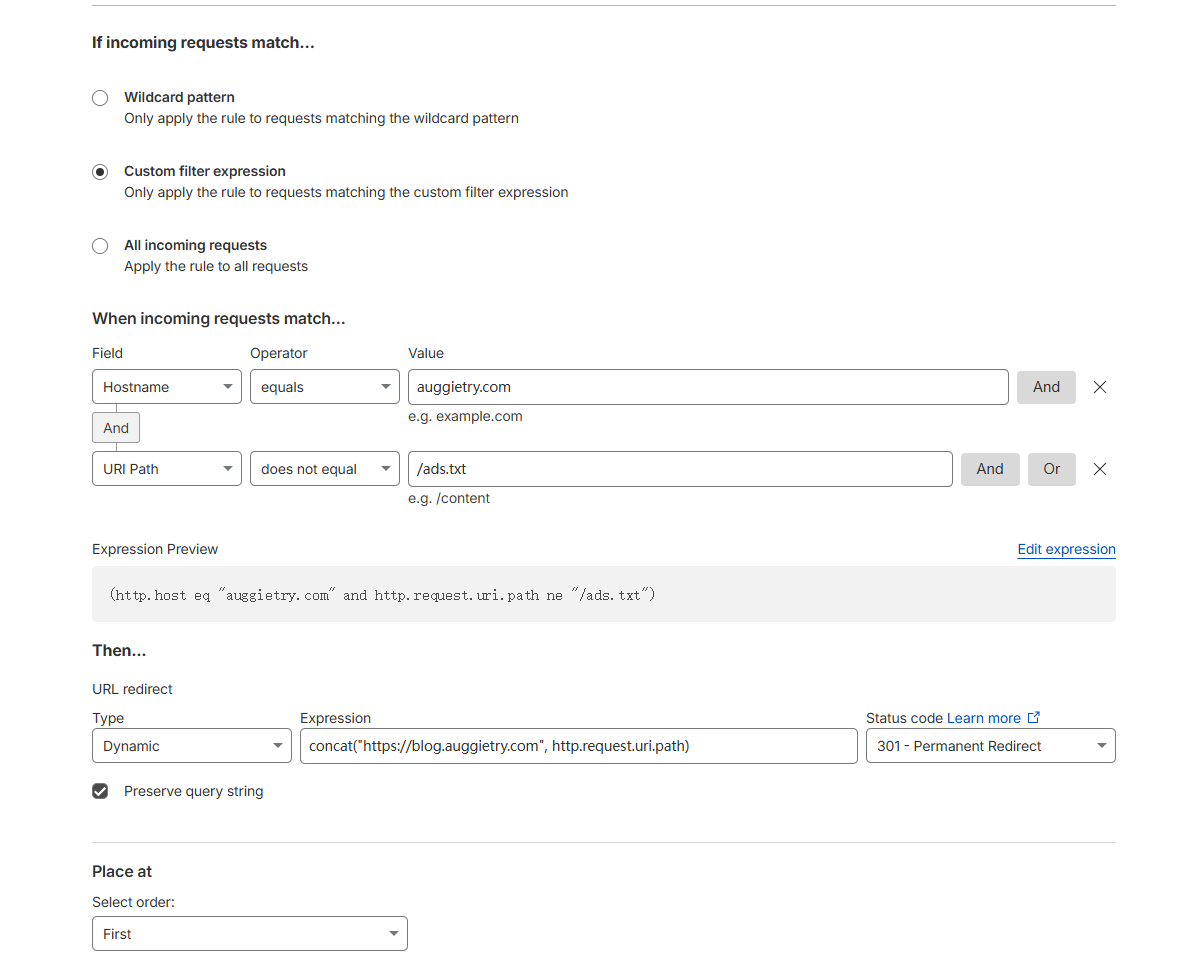
To avoid attribution confusion caused by both the root domain and subdomain being accessible, it is recommended to configure a redirect rule in Cloudflare Rules: automatically redirect visits to the root domain to the blog subdomain, ensuring that ad recognition logic only applies to the subdomain.
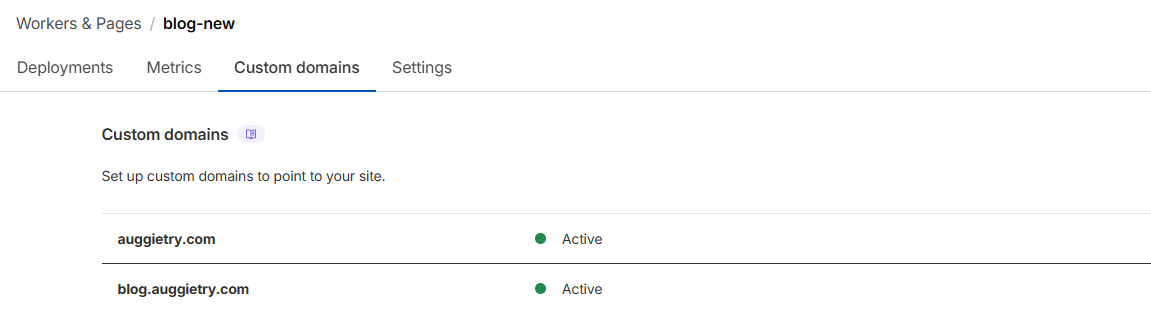
Cloudflare Pages needs to bind both the root domain and the blog subdomain. For DNS, configure a CNAME record pointing the root domain to the domain provided by Pages:
Conclusion
Overall, AI-assisted blog migration is feasible, but don’t expect it to completely replace human judgment. Its value lies in quickly generating frameworks and reducing documentation lookup time, while detail tuning, style control, and platform-specific configuration still require hands-on effort. The choice of model has a significant impact on efficiency, a lesson that was particularly evident throughout this process.
Comments